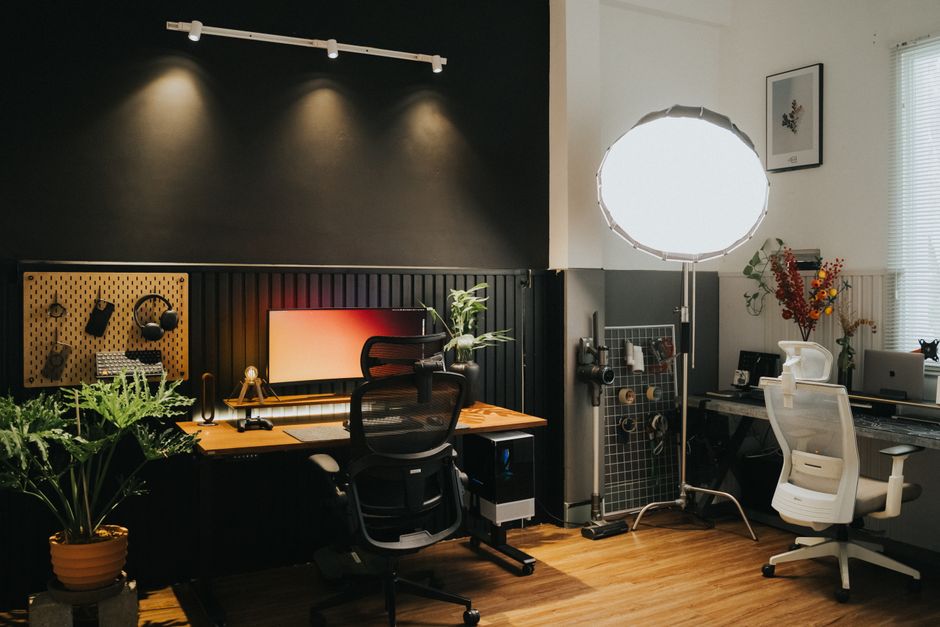
How to Set Up an Ergonomic Home Office on a Budget
Setting up an ergonomic home office on a budget involves a thoughtful approach to selecting and arranging furniture, equipment, and lighting to support comfort and reduce physical strain during extended periods of work. Many people assume that ergonomic adjustments require expensive, specialized products, but with careful planning, it is possible to create a functional workspace without significant financial outlay. The goal is to align the workstation with the body’s natural posture and movement patterns, which can help minimize discomfort and support sustained concentration.
This article outlines practical steps for assembling an affordable ergonomic setup, focusing on the chair, desk, lighting, and other key elements. It emphasizes incremental adjustments and repurposing existing items where feasible, rather than advocating for a complete overhaul. By understanding the underlying principles of ergonomics, individuals can make informed decisions that suit their specific needs and constraints. The suggestions provided are general in nature and may require adaptation based on individual circumstances and available resources.
Before making any changes, it is advisable to assess your current workspace and identify areas that may contribute to discomfort. Simple modifications, such as adjusting the height of a chair or repositioning a monitor, can often yield noticeable improvements. The following sections explore each component in detail, offering budget-friendly options and strategies for optimizing your home office environment.
Assessing Your Current Workspace and Needs
The first step in creating an ergonomic home office on a budget is to evaluate your existing setup and daily work habits. Consider the types of tasks you perform, the duration of your work sessions, and any physical discomfort you experience. This assessment helps prioritize changes that may have the most impact. For example, if you spend hours typing, the position of your keyboard and mouse becomes critical. If you participate in frequent video calls, monitor height and lighting become more important.
Measure your current furniture and compare it to recommended ergonomic guidelines. The ideal desk height allows your elbows to rest at approximately 90 degrees when typing, while the chair height should let your feet rest flat on the floor with thighs parallel to the ground. If your current furniture does not meet these criteria, you may need to consider adjustments or replacements. However, many budget-friendly solutions exist, such as using a footrest or cushion to modify seat height.
Identify any items you already own that could serve a dual purpose. For instance, a sturdy box or a stack of books can act as a monitor stand to raise the screen to eye level. A rolled-up towel can provide lumbar support. These temporary fixes can be effective while you plan more permanent solutions. It is also helpful to note the layout of your room, including power outlets, windows, and traffic flow, as these factors influence furniture placement and lighting choices.
Finally, consider your budget constraints and how much you are willing to invest. Ergonomic improvements can be made incrementally, starting with the most pressing issues. Prioritizing changes that address immediate discomfort or risk of strain is a practical approach. Remember that even small adjustments can contribute to a more comfortable and productive work environment.
Choosing an Ergonomic Chair Without Breaking the Bank
The chair is often considered the cornerstone of an ergonomic setup because it directly supports the spine and pelvis during prolonged sitting. A suitable chair should offer adjustable seat height, backrest angle, and lumbar support. While high-end ergonomic chairs can be costly, there are several budget-friendly alternatives that provide essential adjustability. Look for chairs with a five-point base for stability, breathable fabric for comfort, and a seat pan that allows for a small gap between the edge of the seat and the back of your knees.
If purchasing a new chair is not feasible, consider refurbished or pre-owned office chairs from reputable sources. Many office furniture stores sell off-lease chairs that have been inspected and cleaned. Online marketplaces and local classifieds often list quality chairs at reduced prices. When evaluating a used chair, check for wear on the gas cylinder, casters, and upholstery, as these components affect functionality and longevity.
For those who prefer a DIY approach, it is possible to modify an existing chair to improve its ergonomics. Adding a lumbar cushion or a rolled towel can provide lower back support. Placing a firm cushion on the seat can increase height if needed. However, be cautious about making modifications that compromise the chair’s stability or safety. Always test any adjustments for comfort and security before relying on them for extended periods.
It is also important to adjust your chair correctly once you have it. Set the seat height so your feet are flat on the floor, or use a footrest if your chair cannot go low enough. Adjust the backrest so it supports the natural curve of your lower back. Armrests, if present, should allow your shoulders to relax and your elbows to rest at a 90-degree angle. Taking the time to fine-tune these settings can significantly enhance comfort.
Optimizing Your Desk and Monitor Position
The desk surface and monitor placement are critical for maintaining neutral wrist and neck postures. An ideal desk height allows your elbows to be at roughly 90 degrees when your hands are on the keyboard, with shoulders relaxed. If your desk is too high or too low, you can use a keyboard tray or an adjustable stand to achieve the correct height. A simple solution is to place your keyboard and mouse on a lower surface, such as a pull-out shelf or a sturdy board supported by books.
Monitor height should be set so the top third of the screen is at or slightly below eye level. This positioning encourages a neutral neck posture and reduces the need to look up or down. If your monitor does not have height adjustment, you can raise it using a stack of books, a ream of paper, or a dedicated monitor stand. Ensure the monitor is directly in front of you, about an arm’s length away, to minimize eye strain and neck twisting.
For those who use a laptop, consider adding an external keyboard and mouse to allow for better screen height and arm position. This setup can be more ergonomic than using the laptop’s built-in keyboard and trackpad, which often forces the user to look down and reach forward. Budget-friendly external keyboards and mice are widely available, and even basic models can improve comfort.
Organize your desk to keep frequently used items within easy reach, reducing repetitive stretching or twisting. Place your phone, notepad, and pens in accessible locations. Cable management can also help maintain a clutter-free workspace, which may contribute to a sense of order and reduce distractions. Use adhesive clips or a simple box to corral cables behind the desk.
Lighting and Environmental Adjustments
Proper lighting is essential for reducing eye strain and creating a comfortable work environment. Aim for a combination of ambient and task lighting that minimizes glare and shadows. Natural light is ideal, but it should be controlled to avoid direct glare on your screen. Position your desk perpendicular to windows if possible, and use blinds or curtains to adjust the amount of incoming light. If natural light is insufficient, supplement with overhead lighting and a desk lamp.
When selecting a desk lamp, look for one with adjustable brightness and color temperature. Cooler temperatures (around 5000K) are often recommended for focused work, while warmer temperatures (around 3000K) can be more relaxing. An LED lamp is energy-efficient and can provide ample light without generating excessive heat. Place the lamp to the side of your dominant hand to reduce shadows on your work area.
Beyond lighting, consider other environmental factors such as temperature, air quality, and noise. A comfortable room temperature, typically between 68 and 76 degrees Fahrenheit, can support concentration. If noise is a concern, a pair of inexpensive earplugs or a white noise machine may help. Adding a small plant can improve air quality and add a touch of nature, though its impact on air quality is limited in a small room.
Finally, take regular breaks to stand, stretch, and rest your eyes. The 20-20-20 rule suggests looking at something 20 feet away for 20 seconds every 20 minutes. This simple habit can reduce eye fatigue and encourage movement. Setting a timer or using a break reminder app can help establish this routine. Remember that no setup is perfect for everyone, and adjustments may be needed over time as your body and tasks change.
Budget-Friendly Accessories and DIY Solutions
There are numerous inexpensive accessories that can enhance the ergonomics of your home office. A footrest can help maintain proper leg posture if your chair height cannot be adjusted sufficiently. You can make a DIY footrest from a sturdy box or a stack of books. A keyboard wrist rest can support your wrists during typing, though it should be used to keep wrists in a neutral position, not angled upward. A mouse pad with a wrist support can serve a similar purpose.
Anti-fatigue mats are beneficial if you use a standing desk or stand for extended periods. They provide cushioning and encourage subtle movements that can reduce fatigue. Budget versions are available, or you can use a thick rug or folded blanket as a temporary alternative. If you have a standing desk, consider alternating between sitting and standing throughout the day to vary your posture.
For monitor and laptop positioning, a simple monitor stand or a stack of books can raise the screen to the correct height. A laptop stand can elevate the screen, but it should be paired with an external keyboard and mouse to maintain proper arm position. Cable management solutions, such as zip ties or adhesive clips, can keep cords organized and prevent tripping hazards.
Repurposing household items is a cost-effective way to address ergonomic needs. For example, a rolled towel can provide lumbar support, and a small cushion can raise your seat height. However, ensure that any DIY solution is stable and does not introduce new risks. Test any modifications carefully and adjust as needed.
In conclusion, setting up an ergonomic home office on a budget is achievable through careful assessment, prioritization, and creativity. By focusing on the chair, desk, monitor position, lighting, and accessories, you can create a workspace that supports comfort and reduces strain. Remember that ergonomics is a personal journey, and what works for one person may not work for another. Regular evaluation and adjustment are key to maintaining a healthy and productive work environment. The suggestions here are general and should be tailored to your individual needs and circumstances.